
Risk Warning:
CFDs, Forex, and Cryptocurrencies are complex instruments and come with a high risk of losing money rapidly due to leverage and extreme market volatility. You should consider whether you understand how these markets work, and whether you can afford to take the high risk of losing your money.
You do not own or have rights in the underlying assets. Past performance, including the success rates of previous signals or copy trading strategies, is no indication of future performance.
No Financial Advice:
The information provided by SRFXGlobal—including but not limited to VIP signals, chart analysis, mentorship programs, Telegram alerts, and content distributed across all platforms—is strictly for educational and informational purposes. It is general in nature and does not constitute professional financial, investment, or trading advice. It does not take into account your personal objectives, financial circumstances, or needs.
Service Disclaimer:
Service Disclaimer: Engaging in copy trading, utilizing account management services, or following trading signals carries inherent risks. SRFXGlobal and its team are not liable for any financial losses incurred as a result of using our services, following our analysis, or executing trades based on our alerts. Technical factors, such as execution delays or platform latency, may impact results. Trading in financial markets involves significant risk, and you are solely responsible for your own trading decisions.
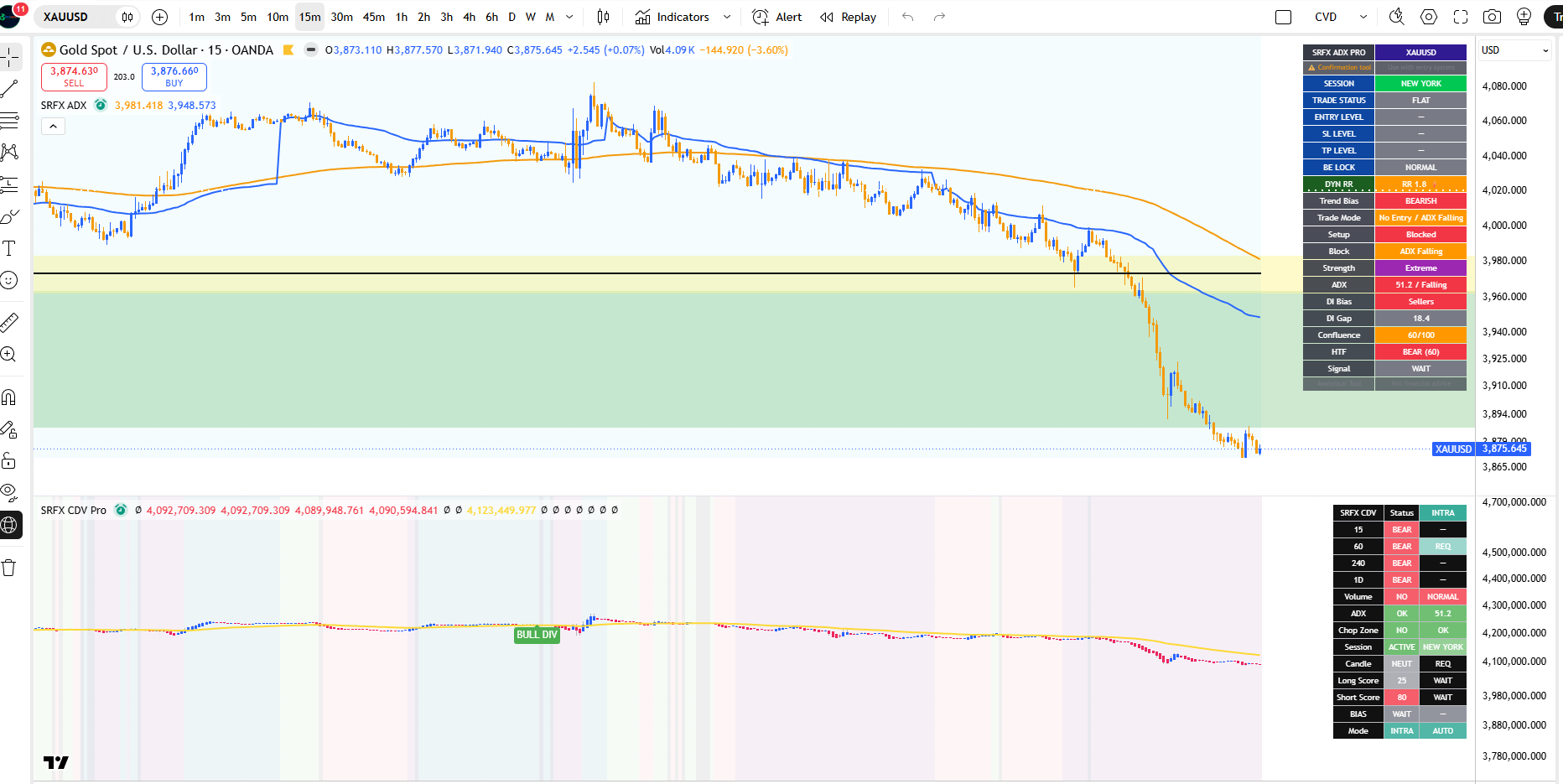
Its purpose is to answer one focused question on each bar: is the current market trending, in which direction, and is that direction supported by surrounding context?
The output is presented through on-chart bias labels, an information dashboard, EMA/VWAP overlays, and structured alert messages.
This is an analytical and confirmation tool. It is not financial advice and makes no claim about future outcomes.
HOW IT WORKS
The core engine recalculates ADX, DI+, and DI- using Wilder-style smoothing. From these values, the script derives directional bias, buyer/seller control, and trend-strength classification using user-defined ADX thresholds.
Because a raw DI direction can be noisy, the tool layers several independent context filters on top of the ADX core:
• EMA filter — checks whether price is positioned on the correct side of the selected EMA
• VWAP filter — confirms price location relative to VWAP, with an intraday-only option
• ADX-rising requirement — optionally requires ADX to be expanding rather than fading
• Higher-timeframe alignment — checks a separate ADX/DI calculation from a higher timeframe
• Adaptive HTF selection — can automatically choose the higher timeframe based on the chart timeframe
• Session gate — can restrict signals to London / New York hours and is treated as not applicable on daily and higher timeframes
• Early DI-convergence detection — looks for DI+ and DI- narrowing with directional momentum before a full DI crossover occurs
• Cooldown filter — reduces repeated signals in clustered conditions
Each qualifying direction is scored by a confluence model that combines DI bias, ADX level, ADX direction, VWAP, EMA, and higher-timeframe agreement into a 0–100 reading.
The score is capped lower in weaker regimes, such as weak ADX, falling ADX, or weak higher-timeframe trend conditions. This helps the displayed score reflect poor conditions more honestly instead of overstating confidence.
REFERENCE LEVELS AND RISK CONTEXT
When a confirmation signal appears, the script displays reference levels based on ATR and a risk/reward setting that can adapt to ADX strength. It can also track a break-even reference after price moves by the selected R-multiple.
These levels are analytical reference points shown for planning and consistency. They are not trade instructions.
WHAT MAKES IT DIFFERENT
ADX, DI, EMA, VWAP, and session filters are well-known tools individually. The value of this script is in how these components are integrated into a single confirmation workflow.
Instead of displaying unrelated tools side by side, SRFX ADX Trend Filter Pro routes them through one gating-and-scoring framework. A directional reading is only highlighted when trend strength, DI control, price location, higher-timeframe context, session status, and cooldown conditions support the same side.
Custom elements in this implementation include:
• Adaptive higher-timeframe selection
• Early DI-convergence detection with safety gating
• Capped confluence scoring that downgrades weak regimes
• ATR-based reference levels
• Break-even reference tracking
• A unified dashboard showing trend, block reason, confluence, HTF, and trade-reference state
• Structured alert payloads for webhook-style alert handling
The goal is a single, consistent trend-confirmation layer rather than a collection of overlapping signals.
HOW TO USE IT
1. Add the indicator to your chart.
2. Pair it with your own entry model or price-action method.
3. Use the dashboard to read trend bias, ADX strength, ADX direction, DI control, higher-timeframe state, session status, and confluence score.
4. Treat LONG / SHORT labels as trend-confirmation signals, not automatic entries.
5. EARLY labels mark anticipatory DI-convergence conditions before a full DI crossover. These are earlier and less confirmed than standard signals.
6. Wait for your own price-action confirmation and apply your own risk management before considering any trade decision.
7. Adjust ADX thresholds, filters, sessions, cooldown, and higher-timeframe behaviour to match your instrument and timeframe.
SETTINGS OVERVIEW
Core ADX / DI: ADX period and trend / strong / extreme thresholds
Trend Filters: EMA, VWAP, ADX-rising requirement, bar-close confirmation
Session Gate: London / New York session windows
Higher Timeframe: automatic or manual HTF selection and HTF ADX minimum
Early DI Detection: DI gap and momentum lookback settings
SL / TP / Risk: ATR stop multiple, dynamic or fixed RR, break-even reference
Cooldown: minimum bars between signals
Display: labels, dashboard, EMA/VWAP plots, and optional background tint
ALERTS
The tool provides dynamic alert messages for LONG, SHORT, EARLY LONG, and EARLY SHORT events. The alert payload includes event type, symbol, timeframe, reference levels, ADX state, DI bias, trend bias, higher-timeframe state, session status, block reason, confluence score, trade-reference state, and note text.
For webhook-style alerts, use TradingView’s “Any alert() function call” option.
Static alert conditions are also included for users who prefer condition-based TradingView alerts.
NOTES AND DISCLAIMER
This script is a confirmation and analysis tool intended to be used with a complete trading plan and your own risk management. It does not predict future prices, does not provide financial advice, and makes no representation regarding results.
Markets carry risk. You are responsible for your own decisions.


